

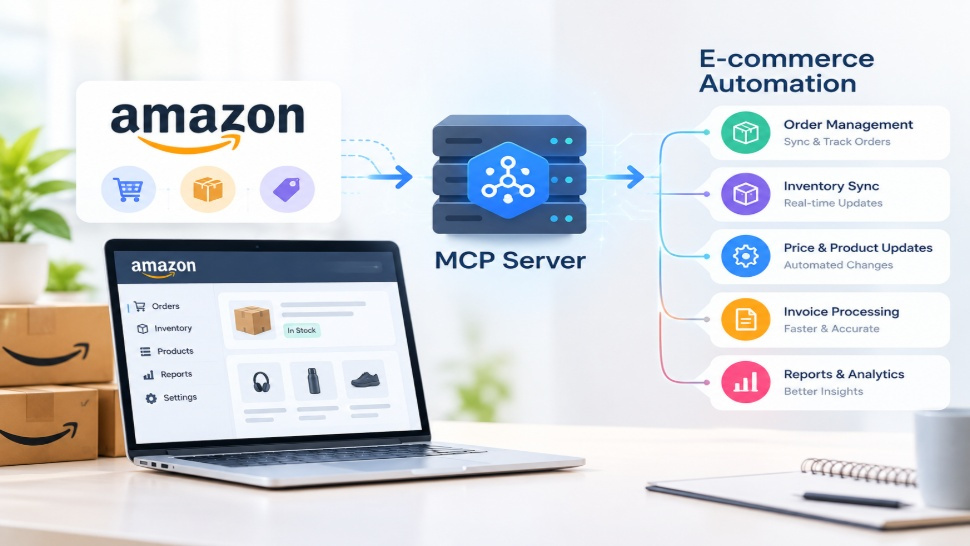

Amazon sellers and e-commerce businesses manage large volumes of orders, inventory data, product information, customer requests, and sales activity every day. Handling these processes manually takes significant time and makes it hard to respond quickly to changing business needs.
Amazon to MCP Server Integration connects Amazon-related data and operations with AI-enabled systems through the Model Context Protocol (MCP). This integration can help businesses give AI applications structured access to relevant Amazon data and tools, allowing them to automate workflows and simplify routine operations.
From monitoring inventory to analyzing orders and retrieving marketplace information, Amazon MCP integration can create a more connected and efficient e-commerce environment.
What Is Amazon to MCP Server Integration?
Amazon to MCP Server Integration is the process of connecting Amazon services, APIs, and business data with an MCP server so AI applications can interact with approved tools and information in a structured way.
The Model Context Protocol (MCP) is designed to help AI applications connect with external systems and use their available tools or data sources. Instead of requiring an AI application to work with every external service through a separate custom connection, MCP provides a standardized approach for exposing capabilities.
For Amazon businesses, an MCP server can act as a controlled connection layer between an AI application and Amazon-related systems. Depending on the implementation, it may allow an AI assistant to retrieve order information, check inventory, access product details, or initiate approved business workflows.
The exact capabilities depend on the APIs, permissions, tools, and security rules configured for the integration.
How Amazon MCP Server Integration Works
Amazon MCP Server Integration typically involves several components working together. Amazon services provide the underlying business data, while APIs provide a way to access permitted information. The MCP server then makes selected capabilities available to an AI application.
A simplified workflow looks like this:
Amazon Services → Amazon APIs → MCP Server → AI Application → Business Action
First, the integration connects with relevant Amazon services through supported APIs. For marketplace operations, Amazon's Selling Partner API (SP-API) can provide access to authorized seller data and operations.
The MCP server defines which tools or resources an AI application can access.
For example, a business could configure tools for retrieving order information, checking inventory levels, or obtaining product-related data. When a user asks an AI application a question, the application can determine whether it needs information from the connected Amazon system. The MCP server can then handle the request and return the permitted information.
This approach creates a structured bridge between AI and e-commerce systems while keeping access controlled according to the integration's configuration.
Key Benefits of Connecting Amazon With MCP
Connecting Amazon with MCP can provide several operational advantages for e-commerce businesses.
Faster Access to Business Data
Teams can use AI interfaces to retrieve relevant Amazon information without manually navigating multiple dashboards or systems. This can make routine data retrieval faster and more convenient.
Reduced Manual Work
Repeated tasks such as checking orders, reviewing inventory information, or gathering product data can potentially be automated through connected tools and workflows.
Better Workflow Automation
Amazon e-commerce automation becomes more practical when AI can interact with approved business tools. Businesses can create workflows that combine Amazon information with other applications and internal systems.
Improved Operational Visibility
A connected AI workflow can bring information from different processes into a more accessible interface. This can help teams understand order activity, inventory conditions, and other operational information.
Scalable AI Integration
MCP provides a structured way to expose tools to AI applications. Businesses can add or modify tools as their automation requirements evolve without redesigning every AI interaction from scratch.
Amazon SP-API and MCP: How They Work Together
Amazon SP-API and MCP serve different purposes, but they can work together in an AI-powered architecture.
Amazon SP-API provides programmatic access to authorized Amazon selling partner data and operations. Developers can use the API to build applications that interact with supported Amazon marketplace functionality.
MCP, on the other hand, provides a standardized mechanism for AI applications to discover and interact with external tools and resources.
In an Amazon MCP integration, SP-API can serve as the underlying Amazon data and operations layer, while the MCP server acts as an intermediary that exposes selected capabilities to an AI application.
For example, an MCP server could provide an approved tool that retrieves certain order information through Amazon's APIs. The AI application can request that tool when needed, and the MCP server handles the communication with the underlying Amazon service.
This architecture can help businesses combine existing Amazon API integration capabilities with modern AI workflows.
E-commerce Operations You Can Automate
The exact automation possibilities depend on the APIs, permissions, business rules, and connected applications. However, several common e-commerce operations can benefit from AI-assisted automation.
Order Monitoring
Businesses can create workflows that retrieve order information and help teams identify pending, recently placed, or potentially delayed orders.
Inventory Management
An integration can help retrieve inventory-related information and support workflows that monitor stock levels or identify products that may require attention.
Product Data Retrieval
AI applications can use approved tools to retrieve product information and help teams work with catalog-related data more efficiently.
Sales Analysis
Amazon data can be combined with analytics systems to support sales reporting, trend analysis, and business insights.
Customer Support Workflows
AI-powered workflows can retrieve relevant order or product information and provide support teams with contextual information when responding to customer inquiries.
Reporting
Businesses can automate the collection of marketplace information and use it to generate structured reports for internal teams.
Use Cases for Amazon MCP Integration
Amazon MCP Integration can support different types of businesses and operational workflows.
E-commerce management: Businesses can connect Amazon data with internal systems to simplify routine marketplace management.
AI-powered reporting: An AI assistant can retrieve approved data and help teams generate summaries or reports based on predefined business requirements.
Inventory alerts: Automated workflows can monitor relevant inventory information and trigger notifications when defined conditions are met.
Order assistance: Teams can use AI interfaces to retrieve order-related information without repeatedly searching through different systems.
Multi-system automation: Amazon information can potentially be combined with CRM, ERP, analytics, customer service, or other business applications through additional integrations.
Decision support: When connected to appropriate data sources, AI applications can help teams organize information and identify operational patterns that require human attention.
These use cases should be designed with appropriate access controls, validation, and human oversight, particularly when workflows can make changes to business data.
How to Implement Amazon to MCP Server Integration
Implementing an Amazon to MCP Server Integration requires more than simply connecting an AI application to Amazon. The integration should be designed around specific business requirements and security considerations.
Step 1: Identify Automation Requirements
Start by identifying which Amazon processes need automation. These could include inventory monitoring, order management, reporting, or product data retrieval.
Step 2: Select the Required Amazon APIs
Determine which Amazon APIs and permissions are necessary for the selected workflows. For many seller-related use cases, Amazon SP-API may be an important part of the architecture.
Step 3: Design the MCP Server
Develop an MCP server that exposes only the tools and resources required by the AI application. Each tool should have clearly defined inputs, outputs, permissions, and business rules.
Step 4: Connect the AI Application
Connect the MCP-compatible AI application to the server and configure access to the approved tools.
Step 5: Add Security and Validation
Authentication, authorization, logging, error handling, and data protection should be included in the integration. Sensitive operations should also have appropriate validation before execution.
Step 6: Test and Monitor
Test each workflow with different scenarios before deploying it to production. Continuous monitoring can help identify API errors, permission problems, unexpected responses, and workflow failures.
Why Choose Vision Infotech for Amazon MCP Integration
Implementing AI-driven e-commerce automation requires experience across APIs, software integration, automation workflows, and AI technologies. Vision Infotech can help businesses design and develop solutions based on their specific Amazon integration requirements.
Our approach can include understanding your existing Amazon workflows, identifying suitable automation opportunities, integrating relevant APIs, developing MCP-based connectivity, and connecting the solution with other business systems where required.
Whether your goal is to improve order workflows, access marketplace data through AI, automate reporting, or connect Amazon with other enterprise applications, a customized integration can be designed around your operational requirements.
With the right architecture, Amazon to MCP Server Integration can become part of a broader strategy for intelligent e-commerce automation.
FAQs
What is Amazon to MCP Server Integration?
Amazon to MCP Server Integration connects Amazon-related services and authorized data with an MCP server, allowing compatible AI applications to interact with selected Amazon tools and information through a structured interface.
What is the role of MCP in Amazon integration?
MCP provides a standardized way for AI applications to discover and use external tools and resources. In an Amazon integration, an MCP server can expose selected Amazon-related capabilities to an AI application.
Can Amazon SP-API work with MCP?
Yes. Amazon SP-API can serve as an underlying API layer while an MCP server exposes selected functionality to an AI application. The available capabilities depend on API access, permissions, and the integration design.
What can be automated with Amazon MCP Integration?
Potential use cases include order information retrieval, inventory monitoring, product data access, reporting, customer support workflows, and other e-commerce processes. The actual automation depends on the APIs and business rules used.
Is Amazon MCP Integration secure?
Security depends on how the integration is designed and implemented. Authentication, authorization, limited permissions, data protection, logging, validation, and monitoring should be incorporated to control how AI applications access Amazon-related systems.
Can Vision Infotech develop an Amazon MCP integration?
Yes. Vision Infotech can develop customized Amazon API and MCP-based integration solutions based on a business's automation requirements, existing systems, workflows, and technical architecture.



Share the News